
Everything You Need to Know About Google Analytics GA4
 About This Article
Reading time: ~6 mins
Format: Article
About This Article
Reading time: ~6 mins
Format: Article

SUMMARY: Google Analytics 4 (GA4) is Google’s current analytics platform that tracks visitor interactions through event-based tracking rather than just page views. Universal Analytics stopped processing data on July 1, 2023, and became inaccessible on July 1, 2024. For tourism businesses, GA4 shows where visitors drop off during the booking process, which campaigns perform best, and what content drives engagement. Key features include cross-platform tracking, stronger privacy protections, custom reporting, shorter default data retention (two months unless extended to 14 months), and no built-in email reports. The article includes setup guides and resources to help tourism businesses get started.
Google Analytics is regularly updated, and some features or layouts may change over time. While we strive to keep this information current, you may notice slight differences in appearance or wording. For the most up-to-date details, please refer to Google’s Analytics help Centre.
Google’s Universal Analytics is officially gone—and if you’re a tourism business, that means it’s time to start fresh with GA4..
Whether you run a destination marketing organization, a tour company, or a charming B&B, understanding how visitors interact with your website is essential. GA4 is your new go-to tool for tracking user behaviour—but it works very differently than Google’s old Universal Analytics (UA). If you haven’t fully switched over to GA4 yet or haven’t set it up correctly, this guide is for you.
This article will walk you through what’s changed, what GA4 can do for your tourism business, and what you need to do next.
Universal Analytics is Gone: What This Means for You
Google officially stopped processing Universal Analytics data on July 1, 2023, and as of July 1, 2024, your old UA data can no longer be accessed. If you didn’t download your reports before then, unfortunately, that historical data is now gone.
If you haven’t set up GA4—or if it was set up but not configured properly—you’re essentially starting from scratch. The good news? GA4 is powerful, flexible, and (once you get the hang of it) a better fit for today’s digital landscape.
What’s GA4 and Why Does It Matter for Tourism Businesses?
Google Analytics 4 (GA4) is the latest version of Google’s analytics platform—and it’s a big shift from the older Universal Analytics. Instead of simply tracking page views and sessions, GA4 focuses on events, which is used to describe and capture every interaction a visitor has with your site. That includes clicking a “Book Now” button, scrolling through your experiences, watching a destination video, or downloading a travel guide.
This data gives you a more detailed picture of how visitors are interacting with your website.
Why this matters for tourism businesses:
- You can see where people drop off during the booking or inquiry process, so you know where to improve.
- You can track which social media or ad campaigns are sending the most engaged visitors.
- You can view web and app data together, which is helpful if you offer both online and mobile booking.
- You can identify which pages are getting the most interaction, like blogs, itineraries, or seasonal deals, and use that insight to guide future marketing.
Google’s GA4 helps you understand not just how many people visited, but what they did and how you can further improve your marketing.
Key GA4 Features
1. Event-Based Tracking (beyond pageviews and Sessions)
GA4‘s event-based tracking records individual actions beyond just how many people landed on your website to tell you what they were actually doing while on your site—like clicking a “Book Now” button, scrolling through your homepage, watching a video, or downloading a brochure. These actions are all tracked as “events.”
GA4 automatically tracks some basic events—like page views, scrolls, outbound clicks, site search, and video engagement—with no extra setup (these are called “enhanced measurement” events).
But if you want to track custom actions specific to your business, like clicks on a booking button or downloads of a travel guide, you’ll need a bit of extra setup. This can usually be done with Google Tag Manager or help from a web developer.
This gives you much deeper insight into how visitors are engaging with your content, so you can focus on what’s working and fix what’s not.
2. Cross-Platform Tracking
Today’s travellers often move between devices. Someone might discover your tourism business on Instagram, browse your site on their phone, and later complete a booking on their laptop. With older analytics tools, that might look like two separate users, but GA4 connects the dots.
With cross-platform tracking, GA4 helps you see the entire customer journey, whether visitors interact with your website, mobile site, or even your app. It does this using something called data streams, which are like digital pipelines that bring information from your different platforms into one shared dashboard.
To make this work, you’ll need to set up a data stream for each platform you want to track. Most tourism businesses will only need a web data stream, but if you also have an iOS or Android app, your developer can help connect those through Google’s Firebase platform. Once connected, GA4 can link actions across devices—so you can see how users move from discovery to booking, even if it happens over multiple sessions or screens.
3. Stronger Privacy by Design
With more people concerned about how their data is used and with privacy laws like GDPR, Canada’s PIPEDA, and cookie consent banners becoming the norm—GA4 was designed to protect user privacy while still giving you useful insights.
Unlike the older version of Google’s Universal Analytics, GA4 doesn’t store full IP addresses and is built to adapt to evolving privacy standards. It’s better at working with cookie consent tools and gives users more control over their data.
Even when someone opts out of tracking, like by declining cookies or using an iPhone with strict privacy settings, GA4 uses data modelling to help fill in the blanks. That means you still get a high-level view of your website performance, such as how many people visited or which pages were most popular, without collecting personally identifiable information.
This balance between data and privacy means you can still make informed decisions about your marketing and website, without compromising trust.
4. Custom Reports and Explorations
Every tourism business is different, and GA4 recognizes that. That’s why it gives you – not just generic metrics – but more flexibility to create reports that focus on what matters to you..
Along with the default reports that GA4 automatically generates—like traffic, engagement, and demographics—there’s also a powerful tool called Explorations. It lets you build custom, interactive reports to dig deeper into specific questions or data trends. Want to see how long visitors are spending on your “Plan Your Trip” page? Or which blog posts are most likely to lead to bookings or newsletter signups? Explorations make that possible.
These reports let you track patterns over time, filter by location or device, and even compare different user groups—like first-time visitors vs. returning guests. It’s all designed to help you understand behaviour, spot opportunities, and make smarter marketing decisions.
You don’t need to be a data expert to get started—there are easy templates and drag-and-drop tools to help guide you.
5. Shorter Data Retention by Default
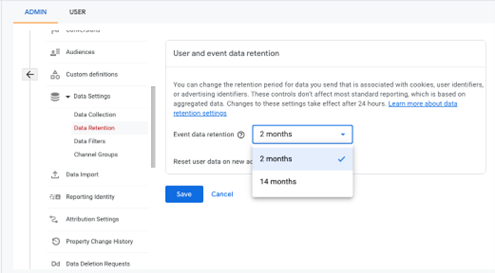
Whereas data stored on Google’s Universal Analytics never expires, by default, GA4 stores just two months of data,. Fortunately, you can extend this to 14 months or download your analytics in a CSV file.
To adjust your data retention, follow these steps:
-
- Log into your Google Analytics account.
● Go to the admin
● Under the property tab, click on “Data Settings”
● Under the drop-down, select “Data Retention”
● Adjust the drop-down from 2 months to 14 months
● Click Save
- Log into your Google Analytics account.
Limited Email Reporting
Unlike Universal Analytics, GA4 doesn’t currently support built-in scheduled email reports. That means you can’t automatically send weekly or monthly updates directly from the GA4 interface, but the platform changes regularly.
However, you still have options:
- You can manually export reports from GA4 as a PDF or CSV to share with your team.
- For more automated reporting, you can use Looker Studio (formerly Google Data Studio) to create live dashboards and set up scheduled email reports from there. This is a great solution if you want a visual summary of performance, customized to your tourism business needs.
So while GA4 is a bit limited in this area, it’s still possible to get the reporting you need, especially when paired with Looker Studio.
Tip: Google Analytics is regularly updated, and some features or layouts may change over time – Be sure you’re checking back regularly!
How to get started with Google Analytics 4
Now that you’ve got a better idea of what GA4 is and why it matters, the next step is simply getting it set up.
It might seem a bit technical at first, but it doesn’t have to be overwhelming. Once you’re up and running, you’ll start seeing real insights that can help you improve your website, understand your visitors, and make smarter marketing decisions.
Here’s how to get started:
Google Analytics 4 offers powerful tools to help tourism businesses better understand their visitors—how they find you, what they’re interested in, and what actions they take on your site. Like any new platform, there’s a bit of a learning curve, but once you get comfortable, the insights can be game-changing.
To help you dig a little deeper and build your confidence, here are a few helpful resources:
- Google Analytics 4 Demo Account
Google offers a free GA4 demo account for both web and app properties. You can explore real data, test different report settings, and try building custom metrics, without affecting your own account. It’s a great way to learn by doing.
Access the GA4 Demo Account - Google Analytics Academy
The Analytics Academy offers free online courses to help you learn how to use GA4 and other Google tools. Whether you’re brand new or ready for advanced tips, it’s a great place to start.
Explore Google Analytics Academy - How to Connect Google Search Console to GA4
Integrating Search Console with GA4 lets you see how people are finding your website through Google Search. It’s a must for tracking organic traffic and improving your visibility.
How to Link Search Console and GA4 - How to Connect Google Ads to GA4
Linking your Google Ads account with GA4 helps you track the full customer journey from ad click to conversion. This gives you better insight into what’s working (and what’s not) with your campaigns.
How to Link Google Ads and GA4
Digital tools and platforms used in tourism marketing evolve quickly. Features, algorithms, interfaces, AI and even how travellers find or engage with your content may change over time. This article is designed to stay relevant for tourism businesses in BC, but processes, settings, and terminology can shift. For the most accurate and current information, always check the official documentation or help pages of the tools and platforms you use to share, advertise, or manage your tourism business online.
Last updated: July, 2025