
• News
  • Our Commitments
  • Work With Us
  • Contact Us
  • FIFA World Cup 26™
Destination British Columbia logo
  • Who We Are
    • Overview
    • Provincial Government of BC
    • Board Of Directors
    • Executive Leadership
    • Tourism Marketing Committee
    • Accessibility and Inclusion Committee
    • Regional, Community & Industry
      Partners
      • Industry Partners
      • Community Partners
    • Vancouver, Coast & Mountains Tourism Region
      • Industry Support Areas
      • Meet the Team
      • Events
      • Regional Maps
      • Stay Connected
    • Corporate Documents
    • The Value of Tourism
  • What We Do
    • Overview
    • BC’s Destination Brands
      • Rainforest to Rockies
      • The Great Wilderness
      • The Infinite Coast
      • Valleys & Vineyards
      • Birthplace of Adventure
      • Nature’s Heartland
    • Marketing
      • Consumer Marketing
      • Content Marketing
      • Social Media Marketing
      • Travel Trade
      • Travel Media
      • Our Markets
    • BCTourismFC
      • Beautiful Seats
    • Destination Management
      • Destination Development
      • Planning Area Look Up Tool
      • Emergency Preparedness
      • Learning Centre
      • Visitor Services
      • BC Tourism Climate Resiliency Initiative
    • Indigenous Tourism
      • Respectful Growth of Indigenous Tourism
      • Our Commitments
      • Truth and Reconciliation
    • Funding Sources
      • Co-op Marketing
      • Municipal & Regional District Tax Program (MRDT)
      • External Funding Sources
  • Strategic Approach
    • Overview
    • Corporate Strategy
      • Our 2023-2025 Corporate Strategy
      • Engagement and Input
      • Where We Will Focus
      • How We Will Succeed: Our Strategic Levers
      • Summary of Key Strategic Shifts
      • Alignment to Government Strategies
    • Marketing Strategy
    • Invest in Iconics Strategy
    • Diversity, Equity, Inclusion, and Accessibility
    • Truth and Reconciliation
    • Tackling Tariffs
  • Learning Centre
    • Overview
    • Workshops & Upcoming Opportunities
    • Digital & Social Media Marketing
    • Tourism & Business Planning
    • Experience Development
    • Travel Trade & Travel Media
    • Crisis & Emergency Planning
    • Accessible Tourism
    • BC's Destination Brand Resources
    • Additional Learning Resources
  • Research & Insights
    • Overview
    • Industry Performance
    • Regional Research
    • Market Research
    • Activity Research
    • Resident Research
    • Research Tools & Methods
  • Who We Are
    • Overview
    • Provincial Government of BC
    • Board Of Directors
    • Executive Leadership
    • Tourism Marketing Committee
    • Accessibility and Inclusion Committee
    • Regional, Community & Industry
      Partners
      • Industry Partners
      • Community Partners
    • Vancouver, Coast & Mountains Tourism Region
      • Industry Support Areas
      • Meet the Team
      • Events
      • Regional Maps
      • Stay Connected
    • Corporate Documents
    • The Value of Tourism
  • What We Do
    • Overview
    • BC’s Destination Brands
      • Rainforest to Rockies
      • The Great Wilderness
      • The Infinite Coast
      • Valleys & Vineyards
      • Birthplace of Adventure
      • Nature’s Heartland
    • Marketing
      • Consumer Marketing
      • Content Marketing
      • Social Media Marketing
      • Travel Trade
      • Travel Media
      • Our Markets
    • BCTourismFC
      • Beautiful Seats
    • Destination Management
      • Destination Development
      • Planning Area Look Up Tool
      • Emergency Preparedness
      • Learning Centre
      • Visitor Services
      • BC Tourism Climate Resiliency Initiative
    • Indigenous Tourism
      • Respectful Growth of Indigenous Tourism
      • Our Commitments
      • Truth and Reconciliation
    • Funding Sources
      • Co-op Marketing
      • Municipal & Regional District Tax Program (MRDT)
      • External Funding Sources
  • Strategic Approach
    • Overview
    • Corporate Strategy
      • Our 2023-2025 Corporate Strategy
      • Engagement and Input
      • Where We Will Focus
      • How We Will Succeed: Our Strategic Levers
      • Summary of Key Strategic Shifts
      • Alignment to Government Strategies
    • Marketing Strategy
    • Invest in Iconics Strategy
    • Diversity, Equity, Inclusion, and Accessibility
    • Truth and Reconciliation
    • Tackling Tariffs
  • Learning Centre
    • Overview
    • Workshops & Upcoming Opportunities
    • Digital & Social Media Marketing
    • Tourism & Business Planning
    • Experience Development
    • Travel Trade & Travel Media
    • Crisis & Emergency Planning
    • Accessible Tourism
    • BC's Destination Brand Resources
    • Additional Learning Resources
  • Research & Insights
    • Overview
    • Industry Performance
    • Regional Research
    • Market Research
    • Activity Research
    • Resident Research
    • Research Tools & Methods
  • News
  • Our Commitments
  • Work With Us
  • Contact Us
  • FIFA World Cup 26™
  • Home
  • |
  • Learning Centre
  • |
  • Digital Marketing
  • |
  • Digital Foundations
  • |
  • Module 6 – Reviewing the Usability and Accessibility of Your Website

Module 6 – Reviewing the Usability and Accessibility of Your Website

Regularly reviewing your website using these tools will ensure you are providing your users a quality experience and that you are compliant with design best practices and accessibility guidelines. Use the following tools to test the usability and accessibility of your website:

Article icon About This Tool Reading time: ~3 mins Format: Tool
light bulb icon

Some of these fixes may require the support or guidance of a web developer or web designer.

Google Lighthouse

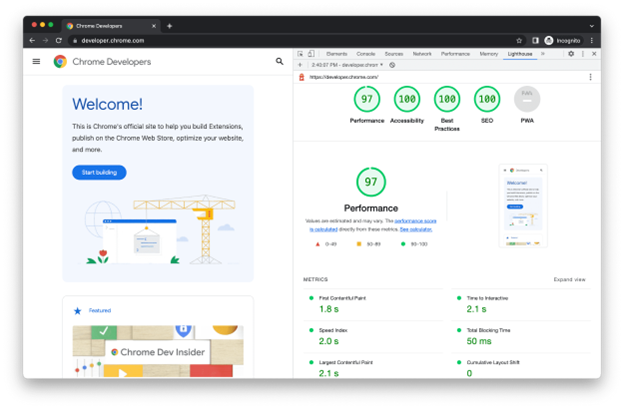
This tool dynamically analyzes web pages and generates a report on how well the selected page performs. The report reviews Performance, Accessibility, Best Practice and SEO, and indicates where and how to implement fixes. 

To run your tests, first open your website in Google Chrome, then right-click anywhere on your website and select “Inspect” from the list that appears. This will open your Chrome Dev Tools.

Click the >> from the list of items that will appear in the top right, in that dropdown select Lighthouse:

Select which factor you would like to test (e.g. Performance, Accessibility, Best Practice, SEO) and which device you would like it tested on (Mobile or Desktop).
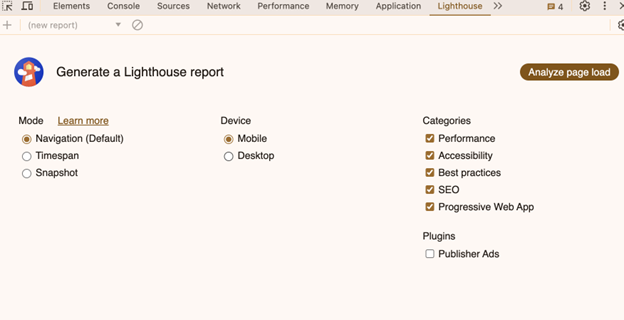
Click Analyze page load and the test will begin. After about 30 seconds, Lighthouse generates a report on the page.
light bulb icon

Easily check how your website appears across different devices using this button in the top left of your Chrome Dev Tools.

Performance

The performance audit uses Google Page Speed Insights Tool (PSI) to examine the content and interactive load times of your site. The site speed test measures how quickly the contents of a page are viewable to the user.

Best Practices

This audit relates to developmental best practices such as using HTTPS and displaying images with correct aspect ratios.

Accessibility

The accessibility audit highlights opportunities to improve the accessibility of your site. Manual testing is also encouraged as all issues cannot be automatically detected.

SEO

This basic SEO audit ensures your site is optimized for search engine results rankings.
 

Google Mobile-Friendly Test

Use this tool to test how easily a visitor can use your page on a mobile device. Enter a page URL into the field at the top of the page to see how your site scores.

This tool can determine whether your website:

  • Follows responsive design and on-page content appears consistently across devices.
  • Has content that is legible and clickable at small screen sizes.
  • Uses incompatible plugins (e.g. plugins such as Flash are not supported by most mobile browsers).


Web Accessibility Evaluation (WAVE) Tool

WAVE is an evaluation tool that will scan a page on your site to identify accessibility and contrast issues, as well as give context to these issues and potential solutions.

WAVE can identify many accessibility and Web Content Accessibility Guideline (WCAG) errors. These calculations are based on the formulas specified by the W3C, but it also facilitates human evaluation of web content. Their philosophy is to focus on issues that are known to impact end users, facilitate human evaluation, and to educate about web accessibility.
 

Contrast Checker Tool 

This tool is built to test colour contrast compliance with the WCAG. To run your test, select a foreground colour and a background colour using RGB or hex code values. The results will generate automatically and you will receive your scores. You will receive a pass, margin or fail, depending on your selections. 

You can also see how your website would appear to a colourblind user, by clicking “See Grayscale” with in the tool. 
 

Other Helpful Chrome Extensions

  • Color Picker Eyedropper 
  • What the Font

Last updated: August, 2024

Share
LinkedIn Twitter Email Print

IN THIS MODULE

Back to Module Overview

Module 6 – Website Accessibility Quick Wins

Creating an accessible website allows visitors with disabilities un-impeded access to your content.
Tool icon
Tool ~4 mins
Learn More

Destination BC

  • Work With Us
  • Contact Us
  • News
  • Corporate Documents
  • Site Map
  • Legal Terms & Privacy Policy

Official Websites

Spirit Bear

SuperNaturalBC.com

Be inspired to start planning your BC Vacation.

B.C. and Guangdong work together to open doors for businesses, create good jobs in B.C.

Travel Media

Information for journalists, editors and broadcasters.

Travel Trade

Tools, resources and contacts to assist you in promoting BC.

red truck in a vineyard

Tourism Business Portal

Online, self-service business listings system for tourism industry.


Follow Us:

Youtube Linkedin

Subscribe to our newsletter

Subscribe
Destination British Columbia logo
© 2025 - Destination BC Corp. – All rights reserved. "Super, Natural British Columbia®", "Super, Natural", "Hello BC" and "Visitor
Centre" and all associated logos/trade-marks are trade-marks or Official Marks of Destination BC Corp.